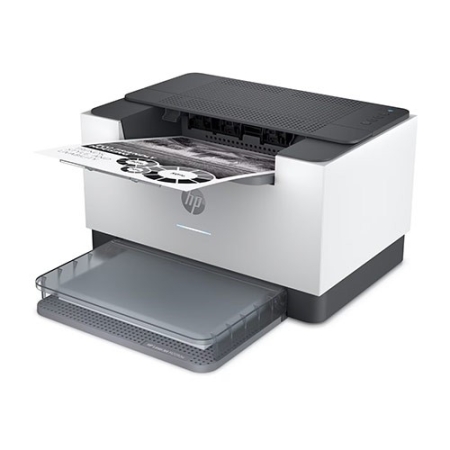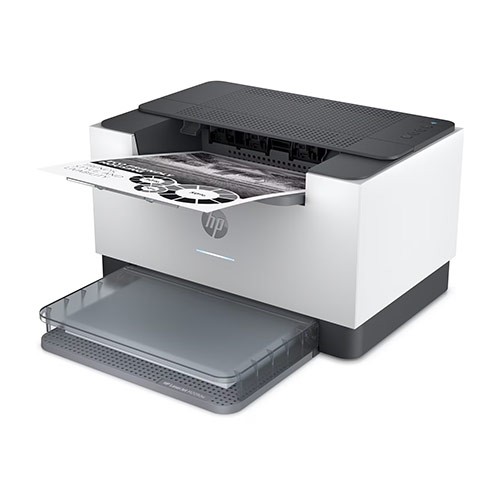
HP LASERJET PRINTER M209dw TONER BK

109.95 (ex. VAT)

* The price is per piece except for some products.
SKU: 6GW62F Category:

Description

Print Speed – Black (normal)
Up to 30 ppm

Printer page yield

Declared yield value in accordance with ISO/IEC 19752 and continuous printing. Actual yields vary considerably based on images printed and other factors.

First page out (ready) black

As fast as 6.9 sec

Resolution (black)

Up to 600 x 600 dpi

Monthly duty cycle

Up to 20,000

Recommended monthly page volume

200 to 2,000

Print Technology

Laser

Processor speed

500 MHz

Number of print cartridges

1 (black)

Replacement cartridges

HP 134A Black LaserJet Toner Cartridge, W1340A (~1100), HP 134X Black LaserJet Toner Cartridge, W1340X (~2400)[6]

Product disclaimer

This printer is intended to work only with cartridges that have a new or reused HP chip, and it uses dynamic security measures to block cartridges using a non-HP chip. Periodic firmware updates will maintain the effectiveness of these measures and block cartridges that previously worked. A reused HP chip enables the use of reused, remanufactured, and refilled cartridges. More at:

Print languages

PCLmS; URF; PWG

Automatic paper sensor

Yes

Paper trays, standard

1

Paper trays, maximum

1

Mobile Printing Capability

Apple AirPrint™; Mopria™ certified; HP app; Wi-Fi Direct® printing

Connectivity, standard

1 Gigabit Ethernet 10/100/1000 Base-TX network; 1 Hi-Speed USB 2.0 (device); Wireless 802.11b/g/n, Dual band 2.4GHz/5GHz

Security management

Secure Boot, Secure Firmware Integrity, Runtime Code Integrity, password protected EWS, secure browsing via SSL/TLS 1.0, TLS 1.1, TLS 1.2; TLS 1.0/1.1 disabled by default; Update to OpenSSL version 1.1.1; enable/disable Network ports; SNMPv1, SNMPv2, and SNMPv3, community password change; Secure defaults, Encrypted data at rest, Active FW update, Admin password by default, Cipher & TLS selection; Account lockout; Secure Wi-Fi setup

Minimum system requirements

Apple® macOS High Sierra (v10.13) macOS Mojave (v10.14) macOS Catalina (v10.15) macOS Big Sur (v11); 2 GB HD; Internet required
Microsoft® Windows® 10, 8.1, 8, 2 GB available hard disk space, Internet connection, Microsoft® Internet Explorer.

Compatible operating systems

Windows 11; Windows 10; Windows 8; Windows 8.1; macOS 10.14 Mojave; macOS 10.15 Catalina; macOS 11 Big Sur; macOS 12 Monterey; macOS 15 Sequoia; Linux[14]

Memory, standard

64 MB

Memory, maximum

64 MB

Printer management

HP Printer Assistant (UDC); HP Device Toolbox

Supported network protocols

TCP/IP: IPv4; IPv6; LPD; SLP; Bonjour; WS-Discovery; BOOTP/DHCP/AutoIP; SNMP v 1/2/3;HTTP/HTTPS; UDP; IPP

Hard disk

None

Paper handling input, standard

150-sheet input tray

Paper handling output, standard

100-sheet output tray

Duplex printing

Automatic (standard)

Media sizes supported

Letter, legal, executive, envelopes

Media sizes supported

A4; A5; A6; B5 (JIS)

Media sizes, custom

4 x 6 to 8.5 x 14 in

Media types

Paper (laser, plain, rough, vellum), envelopes, labels, cardstock, postcard

Supported media weight

16 to 43 lb

Media weights by paper path

60 to 163 g/m²

Power

110-volt input voltage: 110 to 127 VAC (+/- 10%), 60 Hz/50 Hz, 4.6 A

Power consumption

420 watts (active printing), 2.0 watts (ready), 0.5 watts (sleep), 0.5 watts (Auto Off/Wake on USB, enabled at shipment), 0.04 watts (Auto-off/Manual-on), 0.04 (Manual Off)

Energy efficiency

ENERGY STAR® certified

Operating temperature range

59 to 90.5º F

Recommended operating temperature

63.5 to 77º F

Operating humidity range

30 to 70% RH

Software included

Downloadable Software from hp.com or 123.hp.com #CD include HP Software Installer, Uninstaller, printer driver and other essential tools.

Warranty

One-year limited warranty

Dimensions (W X D X H)

13.98 x 11 x 8.07 in

Dimensions Maximum (W X D X H)

13.98 x 16.80 x 10.43

Weight

12.35 lb

Package weight

16 lb

What’s in the box

HP LaserJet Pro M209dw Printer; HP Black LaserJet Toner Cartridge(~700 pages); Dust Cover; Reference Guide, Setup Poster, Warranty Guide & Flyer in some countries; Power cord

Cable included

No, USB cable for all regions

Sustainability Impact

Mercury free

Wireless capability

1 built-in Wi-Fi 802.11b/g/n
Print Speed – Black (normal)
Up to 30 ppm

Printer page yield

Declared yield value in accordance with ISO/IEC 19752 and continuous printing. Actual yields vary considerably based on images printed and other factors.

First page out (ready) black

As fast as 6.9 sec

Resolution (black)

Up to 600 x 600 dpi

Monthly duty cycle

Up to 20,000

Recommended monthly page volume

200 to 2,000

Print Technology

Laser

Processor speed

500 MHz

Number of print cartridges

1 (black)

Replacement cartridges

HP 134A Black LaserJet Toner Cartridge, W1340A (~1100), HP 134X Black LaserJet Toner Cartridge, W1340X (~2400)[6]

Product disclaimer

This printer is intended to work only with cartridges that have a new or reused HP chip, and it uses dynamic security measures to block cartridges using a non-HP chip. Periodic firmware updates will maintain the effectiveness of these measures and block cartridges that previously worked. A reused HP chip enables the use of reused, remanufactured, and refilled cartridges. More at:

Print languages

PCLmS; URF; PWG

Automatic paper sensor

Yes

Paper trays, standard

1

Paper trays, maximum

1

Mobile Printing Capability

Apple AirPrint™; Mopria™ certified; HP app; Wi-Fi Direct® printing

Connectivity, standard

1 Gigabit Ethernet 10/100/1000 Base-TX network; 1 Hi-Speed USB 2.0 (device); Wireless 802.11b/g/n, Dual band 2.4GHz/5GHz

Security management

Secure Boot, Secure Firmware Integrity, Runtime Code Integrity, password protected EWS, secure browsing via SSL/TLS 1.0, TLS 1.1, TLS 1.2; TLS 1.0/1.1 disabled by default; Update to OpenSSL version 1.1.1; enable/disable Network ports; SNMPv1, SNMPv2, and SNMPv3, community password change; Secure defaults, Encrypted data at rest, Active FW update, Admin password by default, Cipher & TLS selection; Account lockout; Secure Wi-Fi setup

Minimum system requirements

Apple® macOS High Sierra (v10.13) macOS Mojave (v10.14) macOS Catalina (v10.15) macOS Big Sur (v11); 2 GB HD; Internet required
Microsoft® Windows® 10, 8.1, 8, 2 GB available hard disk space, Internet connection, Microsoft® Internet Explorer.

Compatible operating systems

Windows 11; Windows 10; Windows 8; Windows 8.1; macOS 10.14 Mojave; macOS 10.15 Catalina; macOS 11 Big Sur; macOS 12 Monterey; macOS 15 Sequoia; Linux[14]

Memory, standard

64 MB

Memory, maximum

64 MB

Printer management

HP Printer Assistant (UDC); HP Device Toolbox

Supported network protocols

TCP/IP: IPv4; IPv6; LPD; SLP; Bonjour; WS-Discovery; BOOTP/DHCP/AutoIP; SNMP v 1/2/3;HTTP/HTTPS; UDP; IPP

Hard disk

None

Paper handling input, standard

150-sheet input tray

Paper handling output, standard

100-sheet output tray

Duplex printing

Automatic (standard)

Media sizes supported

Letter, legal, executive, envelopes

Media sizes supported

A4; A5; A6; B5 (JIS)

Media sizes, custom

4 x 6 to 8.5 x 14 in

Media types

Paper (laser, plain, rough, vellum), envelopes, labels, cardstock, postcard

Supported media weight

16 to 43 lb

Media weights by paper path

60 to 163 g/m²

Power

110-volt input voltage: 110 to 127 VAC (+/- 10%), 60 Hz/50 Hz, 4.6 A

Power consumption

420 watts (active printing), 2.0 watts (ready), 0.5 watts (sleep), 0.5 watts (Auto Off/Wake on USB, enabled at shipment), 0.04 watts (Auto-off/Manual-on), 0.04 (Manual Off)

Energy efficiency

ENERGY STAR® certified

Operating temperature range

59 to 90.5º F

Recommended operating temperature

63.5 to 77º F

Operating humidity range

30 to 70% RH

Software included

Downloadable Software from hp.com or 123.hp.com #CD include HP Software Installer, Uninstaller, printer driver and other essential tools.

Warranty

One-year limited warranty

Dimensions (W X D X H)

13.98 x 11 x 8.07 in

Dimensions Maximum (W X D X H)

13.98 x 16.80 x 10.43

Weight

12.35 lb

Package weight

16 lb

What’s in the box

HP LaserJet Pro M209dw Printer; HP Black LaserJet Toner Cartridge(~700 pages); Dust Cover; Reference Guide, Setup Poster, Warranty Guide & Flyer in some countries; Power cord

Cable included

No, USB cable for all regions

Sustainability Impact

Mercury free

Wireless capability

1 built-in Wi-Fi 802.11b/g/n